

Computer animation is a major part of modern digital media. It is used in movies, games, education, and websites. There are many tools that help artists create moving images using computers. What is Animation in Computer? It is the process in which a computer displays many pictures quickly, so motion appears.
What is Computer Animation?
Computer animation is the process by which a computer creates moving pictures. It is made by showing many images one after another. Those images are called frames. When the frames play fast, they appear to move.
There are digital tools that help artists create these frames. They have control over how objects move, change shape, and change color. Computer animation has become common in videos, games, and learning content.
History of Computer Animation
Animation was first created by Émile Cohl in 1908. He made a short animated film called Fantasmagorie. It was drawn by hand, and it was one of the first moving drawings in history. Many years later, computers have changed animation. Computer technology has made animation faster and more advanced.
Early Computer Animation (1960s)
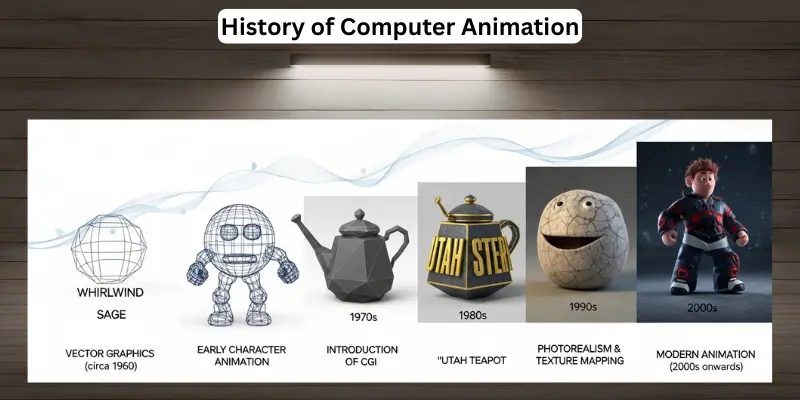
Computer animation began in the 1960s, when scientists used computers to create moving graphics. One of the earliest computer animations was created by Edward E. Zajac at Bell Labs in 1963. He made a computer film to show how a satellite moves in space.
At the same time, John Whitney Sr. has worked on computer-generated motion graphics. His work was important in the growth of digital animation.
Growth of Computer Animation (1970s–1980s)
During the 1970s and 1980s, computer animation improved as computer technology advanced. There were more experiments in digital graphics. Movies and research labs have started using computer-generated images.
Computer Animation in Movies (1990s)
In the 1990s, computer animation became popular in films. There were stronger computers and better software tools. Animated characters looked more realistic. Movie studios have started using full digital animation.
Modern Computer Animation (2000s–Present)
Today, computer animation is very advanced. There are realistic effects, 3D characters, and high-quality graphics. Animation has become common in movies, video games, education, and websites.
Modern tools have made animation easier for beginners and professionals. Computer animation is now an important part of digital media.
How Does Computer Animation Work?
Computer animation is the process by which a computer creates movement by displaying many images in sequence. There are digital tools that help artists design objects and control motion. Each image is called a frame, and when frames play quickly, they appear to move smoothly.
- Idea and Planning: First, the creator chooses a theme and story. The main action is planned to give the animation a clear direction.
- Design Characters and Objects: Artists draw or build characters and scenes using computer tools. The shapes are created using color and detail.
- Modeling (for 3D animation): In 3D animation, objects are built in digital form. They have height, width, and depth.
- Rigging: Rigging is the step where digital bones are added inside a character. This system helps the character move arms, legs, and head.
- Keyframes and Movement: Artists set key positions called keyframes. Then the computer fills the movement between those frames.
- Adding Light and Effects: Light, shadow, and other effects are used to make the scene clearer and more attractive.
- Rendering: Rendering is the final step where the computer turns all frames into a complete video.
- Export and Final Video: The animation is saved as a video file. Then it is ready for movies, games, or learning content.
Types of Computer Animation
Computer animation is not just one type. There are several types that artists use depending on the project. Each type has a special way of showing movement. Some focus on flat images, some on 3D objects, and others on moving text or real objects. Here is a complete 10 types of computer animation:
- 2D Animation: Flat images move in two directions: up-down and left-right. They are common in cartoons and educational videos.
- 3D Animation: Objects have height, width, and depth. They are realistic and used in movies, video games, and simulations.
- Motion Graphics: Moving text, shapes, and icons. They are popular in advertisements, presentations, and social media videos.
- Stop-motion animation: Real objects are moved step by step. The computer joins the images to show motion.
- Rotoscoping: Artists trace over live footage to create new animation or effects.
- Cel Animation (Digital): Classic frame-by-frame drawing is done digitally on computers.
- Procedural Animation: Movement is generated automatically using rules or algorithms.
- Simulation Animation: Natural movements like water, fire, or smoke are created using computer physics.
- Cutout Animation (Digital): Characters are made from separate parts that move like paper cutouts on screen.
- Experimental Animation: New styles or abstract movements are created for art or creative projects.
Application of Computer Animation
Computer animation is used in many areas of daily life. There are different ways it helps people learn, play, and create. Each application has a special purpose. Here is how computer animation is applied in various fields:
- Movies and Cartoons: Animated characters and scenes are created for entertainment.
- Video Games: Characters, objects, and environments are animated to make games lively and interactive.
- Education and E-Learning: Lessons and tutorials use animation to help students understand more easily.
- Advertising and Marketing: Products and services are promoted with motion graphics and animated videos.
- Website Design: Animation is used to make websites attractive and engaging.
- Simulations: Training programs, such as flight or medical simulations, are animated to present realistic scenarios.
- Social Media Content: Animated posts, stickers, and short videos are used to grab attention online.
- Virtual Reality (VR) and Augmented Reality (AR): Animated objects are used to create immersive experiences.
Features of Computer Animation
Computer animation has many features that make it different from traditional animation. These features make it fast, creative, and useful across many fields. Here is a simple explanation of the main 8 features of computer animation:
- Realistic Movement: Characters and objects are made to move naturally. They can walk, jump, or spin just like real life.
- Frame Control: Artists have full control over each frame. They can change speed, direction, and timing easily.
- 3D Modeling: Objects have height, width, and depth. They can rotate and move in all directions.
- Special Effects: Animation can include lighting, shadows, fire, water, smoke, and other elements to make scenes look real.
- Reusability: Characters or objects can be used in many projects without redrawing them every time.
- Editing Flexibility: Changes can be made easily. If something is wrong, artists can fix it without starting over.
- Cost and Time Efficiency: Using computers is faster and cheaper than drawing every frame by hand.
- Interactivity: Animation can be interactive in games or learning apps. Users can control characters or objects.
Difference Between Future and Features of Computer Animation
Many people confuse the future with the features of computer animation. Features are what animation has now. They show how animation works and what it can do today. The future is what animation shall achieve later. It shows how animation can evolve with technology.
| Aspect | Features of Computer Animation | Future of Computer Animation |
|---|---|---|
| Definition | What animation has now? The qualities that make it useful and effective. | What shall animation become in the coming years? New possibilities and growth. |
| Focus | Current tools, effects, and capabilities. | Potential improvements, trends, and new technologies. |
| Example | Realistic movement, 3D modeling, frame control, special effects. | More realistic VR/AR experiences, AI-assisted animation, and interactive movies. |
| Purpose | To show what computer animation can do today. | To predict how animation will develop in the future. |
| Time | Present | Future |
| Usage | Movies, games, education, ads, websites | Advanced simulations, AI animation, virtual reality, next-level interactivity |
Popular Computer Animation Software
There are many software tools that artists use to create computer animation. These tools have different features for 2D, 3D, and motion graphics animation. Both beginners and professionals can use them to create movies, games, ads, and learning content. Here are 14 popular computer animation software:
- Blender
- Adobe After Effects
- Autodesk Maya
- Cinema 4D
- Toon Boom Harmony
- Adobe Animate
- Houdini
- Synfig Studio
- Moho (Anime Studio)
- Unity
- Unreal Engine
- Pencil2D
- Dragonframe
- LightWave 3D
Advantages and Disadvantages of Computer Animation
Computer animation has both advantages and disadvantages. These points are important to know for beginners and professionals. The advantages show why animation is useful, and the disadvantages show the challenges that come with it.
10 Advantages of Computer Animation
- Saves time compared to hand-drawn animation
- Creates realistic movement and effects
- Easy to edit and correct mistakes
- Reusable characters and objects
- Can combine 2D and 3D animation
- Makes learning and presentations more interesting
- Enhances creativity in movies and games
- Produces high-quality graphics
- Allows interactive content in games and apps
- Can create simulations for training and research
10 Disadvantages of Computer Animation
- Requires powerful computers
- Software can be expensive
- Steep learning curve for beginners
- Takes time to render high-quality animation
- Technical issues can delay projects
- May require advanced skills for complex effects
- Large file sizes can be hard to store
- Overuse can reduce originality
- Hardware upgrades may be needed frequently
- Mistakes in keyframes can ruin scenes
Conclusion
Computer animation is an important part of modern digital media. It has changed the way movies, games, education, and advertisements are created. There are many types of software tools and features that make animation creative and effective. While it has some challenges, the advantages are greater. Beginners shall start with simple projects and practice regularly. With time and effort, computer animation can bring ideas to life in exciting and realistic ways.
FAQs About Computer Animation
Here are some common questions and answers about computer animation for beginner students.
What is computer animation?
Computer animation is the process of creating moving images using a computer.
How does computer animation work?
The computer shows many frames one after another. When the frames play fast, motion appears.
What are the main types of computer animation?
The main types are 2D, 3D, motion graphics, stop motion, and simulation animation.
Which software is best for beginners?
Blender is popular because it is free and easy to learn.
Where is computer animation used?
It is used in movies, games, ads, websites, and education.
How long does it take to learn animation?
It depends on practice. Regular practice has better results.
Is computer animation a good career?
Yes, it has many opportunities in media, movies, gaming, and digital content.
What skills are needed for computer animation?
Basic drawing, creativity, patience, and knowledge of animation software are important.
Can beginners create professional animation?
Yes, with practice and the use of software tools, beginners can create high-quality animation.
Is computer animation expensive?
Some software, like Blender, is free, but professional tools may cost money.
